Entry Vs Entry Detail Data/Record Diff Report
Reports->Comparative Analysis->Entry Vs Entry Detail Data/Records Diff Report
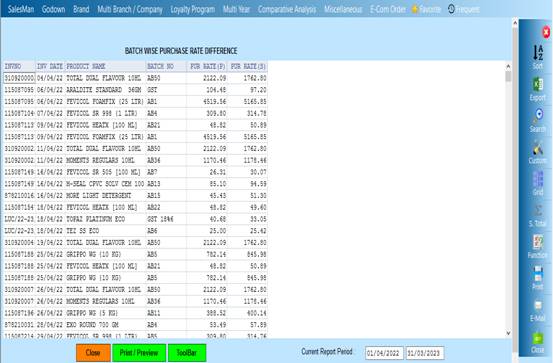
This report will show the record of the product having batch and the purchase rate and if anyone wants to see the report then they have to select the Pur rate diff(Batch),Mismatch number etc then the report will show
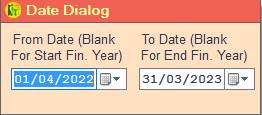
❖ 1.Date Dialog -> Please Select The Date Range And Open The Cusparty
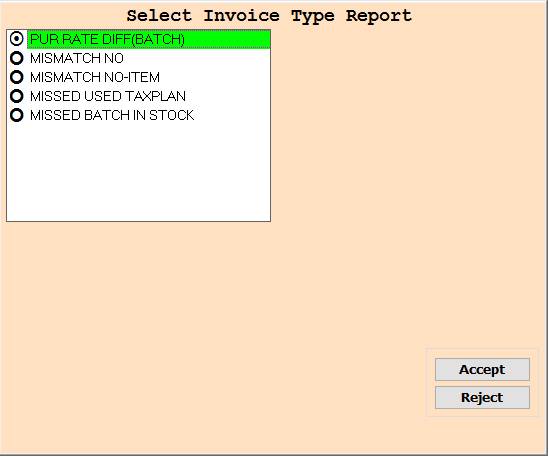
❖ 2.PUR RATE DIFF(BATCH) ->Please Select Pur Rate Diff (Batch) Or Report Show
❖ 3.MISMATCH NO->Please Select Mismatch No Or Report Show
❖ 4.MISMATCH NO-ITEMS->Please Select Mismatch No-Items Or Report Show
❖ 5.MISSED USED TAXPLAN->Please Select Missed Used Taxplan Or Report Show
❖ 6.MISSED BATCH IN STOCK->Please Select Missed Batch In Stock Or Report Show
❖ 7.ACCEPT-> Click On Accept Button To Open The Report
❖ 8. REJECT->Click On The Reject Button To Close This Cusparty Box
❖ 9. Close-> Clicking on the Close button this Report will be close
❖ 10. Print/Preview->Click On The Print/Preview Buttom Open The Print Section
Created with the Personal Edition of HelpNDoc: Make Your PDFs More Secure with Encryption and Password Protection