Equipment Master
Reports->Production Section->Master Creatio&N->Other Master->Equipment Master
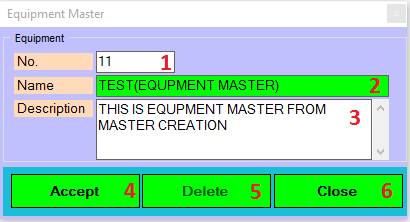
1.. No: This is auto generated No. of Equipment Master.
2.. Name: Please Enter the Name.
3.. Description : Please write Description.
4.. Accept: Click on Accept button this records save.
5.. Delete: Clicking on the delete button this records will be delete.
6.. Close: Clicking on the Close button this form will be closed.
Created with the Personal Edition of HelpNDoc: Free iPhone documentation generator