Monthly Product Wise [Sale / Purchase]
Reports->Comparative Analysis->Monthly Product Wise [Sale/Purchase]
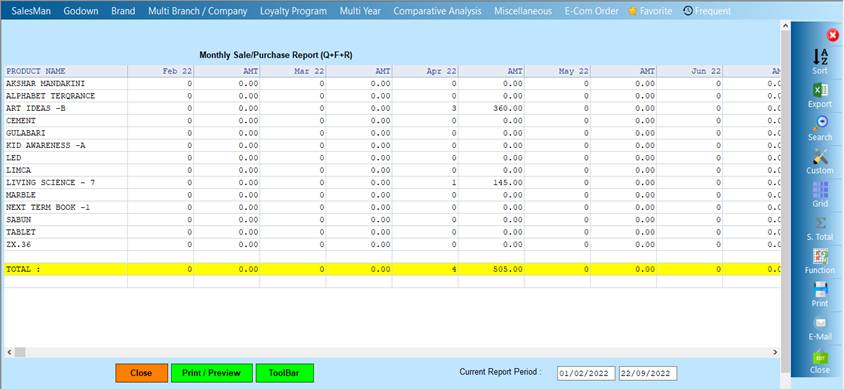
Monthly Product Wise [Sale/Purchase] Report will show the record of the product whose QTY,RPL,FREE is and whoever want to see report then it will show the report
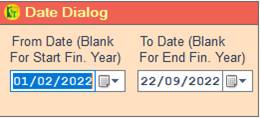
❖ 1.Date Dialog -> Please Select The Date Range And Open The Cusparty
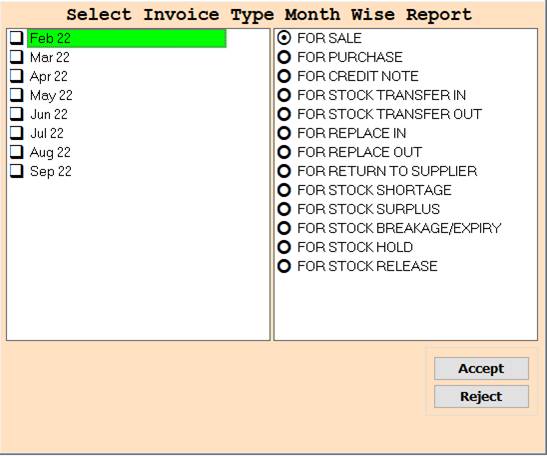
❖ 2.MONTH ->Please Select The Month Name Or Select For Sale Wise Report Show
❖ 3.MONTH ->Press On F3 All Select Month Or Select For Sale Wise Report Show
❖ 4.MONTH ->Please Select The Month Name Or Select For Purchase Wise Report Show
❖ 5.MONTH ->Press On F3 All Select Month Or Select For Purchase Wise Report Show
❖ 6.MONTH ->Please Select The Month Name Or Select For Credit Note Wise Report Show
❖ 7.MONTH ->Press On F3 All Select Month Or Select For Credit Note Wise Report Show
❖ 8.MONTH ->Please Select The Month Name Or Select For Stock Transfer In Wise Report Show
❖ 9.MONTH ->Press On F3 All Select Month Or Select For Stock Transfer In Wise Report Show
❖ 10.MONTH ->Please Select The Month Name Or Select For Stock Transfer Out Wise Report Show
❖ 11.MONTH ->Press On F3 All Select Month Or Select For Stock Transfer Out Wise Report Show
❖ 12.MONTH ->Please Select The Month Name Or Select For Replacement In Wise Report Show
❖ 13.MONTH ->Press On F3 All Select Month Or Select For Replacement In Wise Report Show
❖ 14.MONTH ->Please Select The Month Name Or Select For Replacement Out Wise Report Show
❖ 15.MONTH ->Press On F3 All Select Month Or Select For Replacement Out Wise Report Show
❖ 16.MONTH ->Please Select The Month Name Or Select For Return To Supplier Wise Report Show
❖ 17.MONTH ->Press On F3 All Select Month Or Select For Return To Supplier Wise Report Show
❖ 18.MONTH ->Please Select The Month Name Or Select For Stock Shortage Wise Report Show
❖ 19.MONTH ->Press On F3 All Select Month Or Select For Stock Shortage Wise Report Show
❖ 20.MONTH ->Please Select The Month Name Or Select For Stock Surplus Wise Report Show
❖ 21.MONTH ->Press On F3 All Select Month Or Select For Stock Surplus Wise Report Show
❖ 22.MONTH ->Please Select The Month Name Or Select For Stock Breakage/Expiry Wise Report Show
❖ 23.MONTH -> Press On F3 All Select Month Or Select For Stock Breakage/Expiry Wise Report Show
❖ 24.MONTH -> Please Select The Month Name Or Select For Stock Hold Wise Report Show
❖ 25.MONTH -> Press On F3 All Select Month Or Select For Stock Hold Wise Report Show
❖ 26.MONTH -> Please Select The Month Name Or Select For Stock Release Wise Report Show
❖ 27.MONTH -> Press On F3 All Select Month Or Select For Stock Release Wise Report Show
❖ 28. ACCEPT->Click On The Accept Button Open The Second Cusparty
❖ 29. REJECT->Click On The Reject Button Close This Cusparty Box
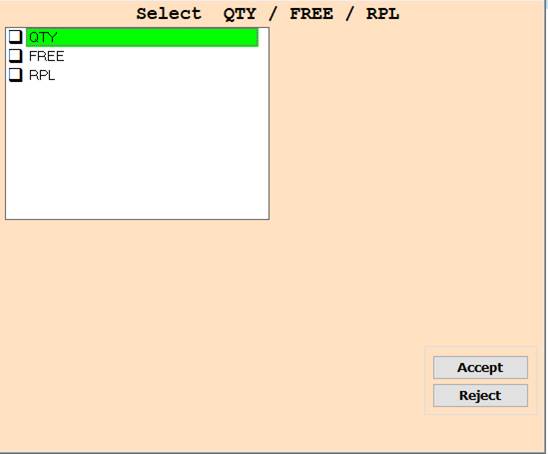
❖ 30. QTY->Please Select The Qty Or Report show
❖ 31. FREE->Please Select The Free Or Report Show
❖ 32.RPL->Please Select The RPL Or Report show
❖ 33.RPL,QTY,FREE->Press On F3 All Select Wise Report Show
❖ 34. ACCEPT->Click On The Accept Button Open The Report
❖ 35. REJECT->Click On The Reject Button Close This Cusparty Box
❖ 36. CLOSE-> Click On the Close Button This Report Will Be Close
❖ 37. PRINT/PREVIEW->Click On The Print/Preview Buttom Open The Print Section
Created with the Personal Edition of HelpNDoc: Benefits of a Help Authoring Tool