Party Company Wise Sale Report
Reports->Comparative Analysis->Party Company Wise Sale Report
Company Party Wise Sale Report will show the records of the party &company and if anyone try to see the report according to the sale & transferout wise then it will show
The report according to the selection
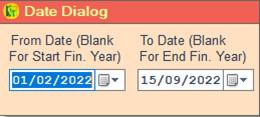
❖ 1.Date Dialog -> Please Select The Date Range And Open The Cusparty
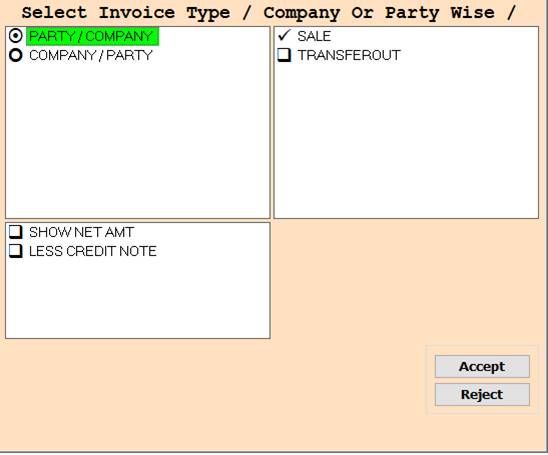
❖ 2.PARTY/COMPANY -> Please Select The Party/Company Or Sale Wise Report Show
❖ 3.PARTY/COMPANY -> Please Select The Party/Company Or Transferout Wise Report Show
❖ 4.PARTY/COMPANY -> Please Select The Party/Company Or Press On F3 All Select Sale and Transferout Wise Report Show
❖ 5. COMPANY/PARTY -> Please Select The Company/Party Or Sale Wise Report Show
❖ 6. COMPANY/PARTY -> Please Select The Company/Party Or Transferout Wise Report Show
❖ 7. COMPANY/PARTY -> Please Select The Company/Party Or Press On F3 All Select Sale and Transferout Wise Report Show
❖ 8. SHOW NET AMT -> Please Select The Show Net Amt Or Sale Wise Report Show
❖ 9. SHOW NET AMT -> Please Select The Show Net Amt Or Transferout Wise Report Show
❖ 10. SHOW NET AMT -> Please Select The Show Net Amt Or Press On F3 All Select Sale and Transferout Wise Report Show
❖ 11. ACCEPT-> Click On The Accept Button Open The Second Cusparty Box
❖ 12. REJECT-> Click On The Reject Button Close This Cusparty Box
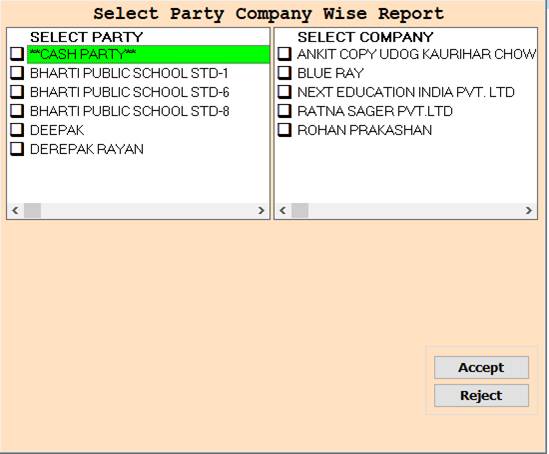
❖ 13. PARTY-> Please Select The Party Or Company Name Wise Report Show
❖ 14. PARTY-> Please Select The Party Or Or Press On F3 All Select Company Name Wise Report Show
❖ 15. PARTY-> Press On F3 All Select Party Or Company Name Wise Report Show
❖ 16.PARTY-> Press On F3 All Select Party Or Press On F3 All Select Company Name Wise Report Show
❖ 17. ACCEPT-> Click On The Accept Button Open This Report
❖ 18. REJECT-> Click On The Reject Button Close This Cusparty Box
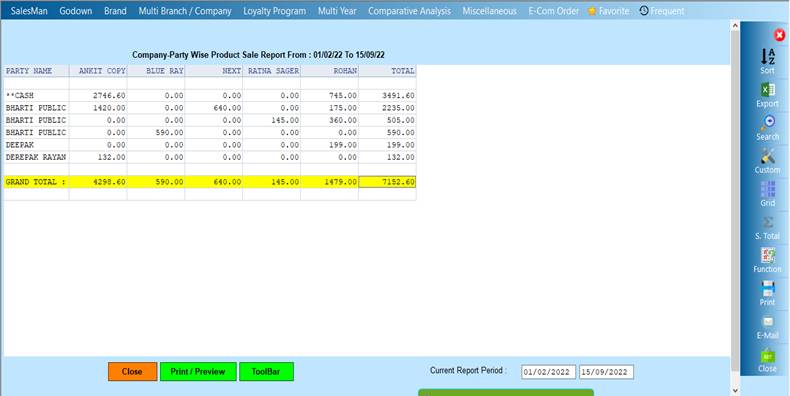
❖ 19. CLOSE-> Click On the Close Button This Report Will Be Close
❖20. PRINT/PREVIEW->Click On The Print/Preview Buttom Open The Print Section
Created with the Personal Edition of HelpNDoc: Easily Add Encryption and Password Protection to Your PDFs