Party Wise[Primary/Secondry/Credit]
Reports->Territory/Management Reports -> Territory Analysis-> Overall Performance -> Party Wise[Primary/Secondary/Credit]
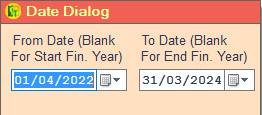
1. Date Dialog -> Please Select The Date Range And Open The Cusparty.
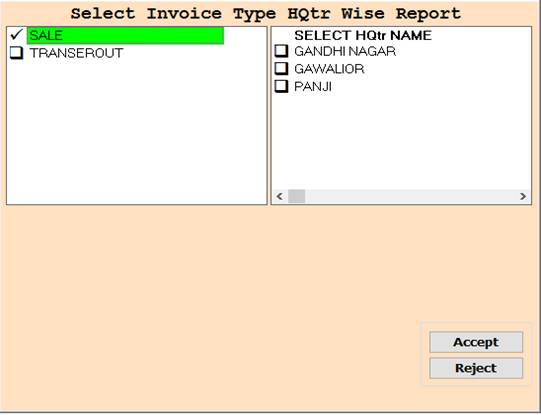
2. In this Window Select Invoice Type or HQtr Name According To Your Need for Show Report,
Through Box Selection And Press F3 For All Selection, if You not Select Any One then All Selected As Default.
3. SALE :- Select For only Sale or HQtr Wise Report.
4. TRANSFEROUT :- Select For only TRANSFEROUT or HQtr Wise Report.
5. Accept :- Click On The Accept Button Open This Report.
6. Reject :- Click to cancel the Operation.
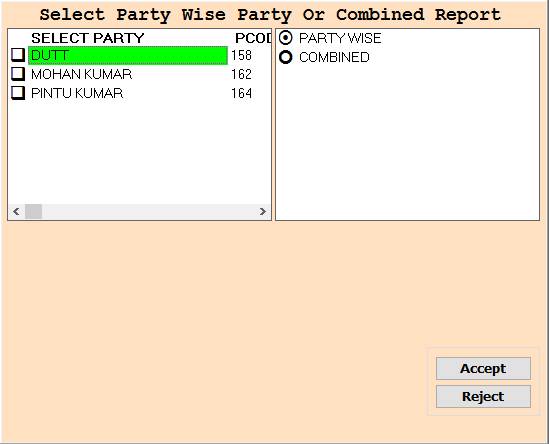
7. In this Window Select Party Name or PartyWise/Combined According To Your Need for Show Report,
Through Box Selection And Press F3 For All Selection,if You not Select Any One then All Selected As Default.
8. Accept :- Click On The Accept Button Open This Report.
9. Reject :- Click to cancel the Operation.
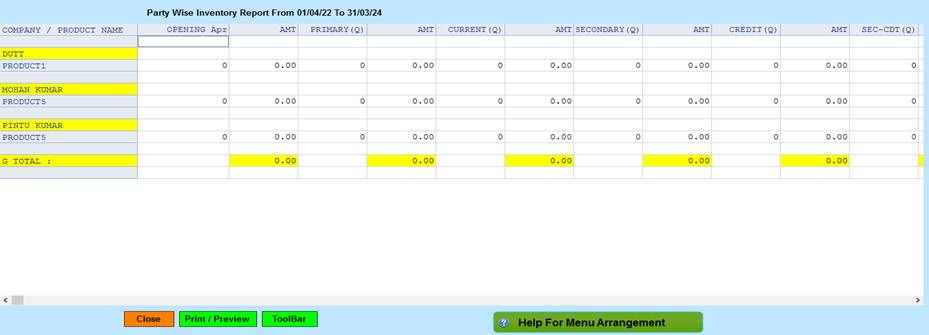
10. Close :- Click on the Close button this Report will be Closed.
11. Print/Preview :- Click On The Print/Preview Button Open The Print Section.
12. ToolBar :- Click to Open Tool Box.
13. Help For menu Arrangement :- Click for Show Menu Help Pdf.
Created with the Personal Edition of HelpNDoc: Free Web Help generator