Standard Protocols
Reports->Production Section->Mfg Entry->Standard Protocols
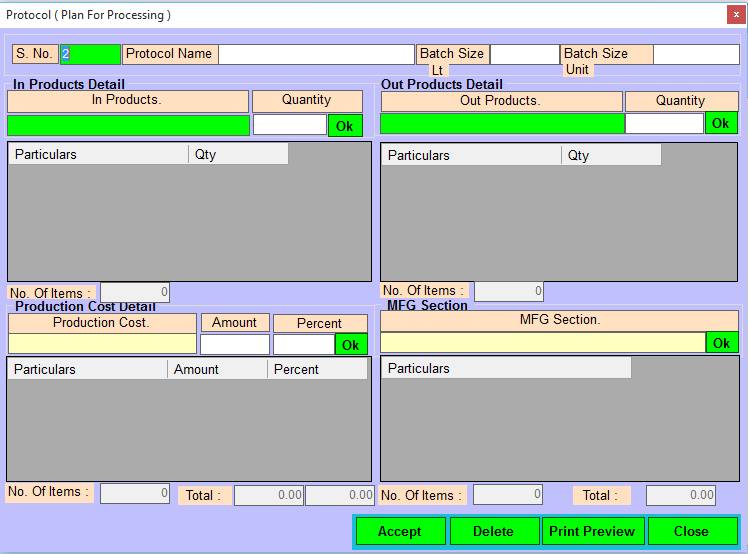
1. S No:- Please Enter Protocol Serial No, Press F2 and UpKey For Exiting Protocols, Also Make Modify in Exiting Protocols .
2. Protocol Name:- Please Enter Protocol Name, Press F2 For Open Selection Window.
3. Batch Size Lt :- Please Enter Batch Size in Lt.
4. Batch Size Unit :- Please Enter Batch Size in Unit.
5. In Products :- Please Select The In Products Name, Press Enter Or Double Click For Open Selection Window .
6. Quantity :- Please Enter In Product Quantity.
7. Ok :- Press Ok Button For Add Particulars In Grid.
8. Out Products :- Please Select The Out Products Name, Press Enter Or Double Click For Open Selection Window.
9. Quantity :- Please Enter Out Product Quantity.
10. Ok :- Press Ok Button For Add Particulars In Grid.
11. No Of Items :- Show The Added Items In Grid.
12. Production Cost :- Press Enter Or Double Click For Open List Selection Window.
13. Amount :- Please Enter The Amount.
14. Percent :- Please Enter The Percent.
15. Ok :- Press Ok Button For Add Particulars In Grid.
16. MFG Section :- Press Enter Or Double Click For Open List Selection Window.
17. No Of Items :- Show The Added Items In Grid.
18. Total :- Show The Total Amount.
19. Accept/Modify :- Click on Accept/Modify button For Save records/Changes, Press Alt+A/M To Accept/Modify
20. Delete :- Click On Delete Button For Delete The Selected Records, Press Alt+D To Delete.
21. Print Preview :-Click on Print Preview Button For Print PreView, Press Alt+P To Print Preview & Save.
22. Close :- Click On the Close Button For This Form will be Closed, Press Alt+C To Close This Form.
Created with the Personal Edition of HelpNDoc: Effortlessly Convert Your Markdown Content with HelpNDoc