Analysis &Entry/Equipment Issue
Reports>Production Section>Mfg Entry>Analysis Entry>D.M. Water Mgt>Analysis Entry/Equipment Issue
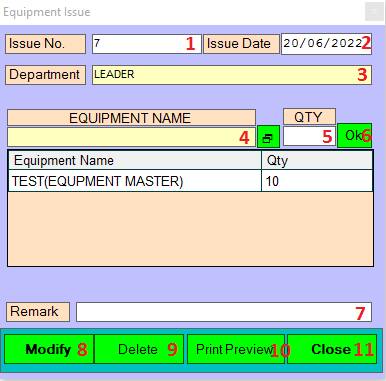
1.. Issue No: This is auto generated No. of Equipment Details.
2.. Issue Date: Please Enter or Double Click to open the protocols list.
3.. Department: Please Enter or double click to open the selection department list.
4.. Equipments Name: Please Enter or double click to open the selection Equipment list.
5.. Qty: Please Enter the Qty.
6.. Ok: Click on the Ok button add to this product.
7.. Remark: Put some remarks if required.
8.. Modify: Click on Modify button this records save.
9.. Delete: Clicking on the delete button this records will be delete.
10.. Print Preview: Click On the Print Preview Records show.
11.. Close: Clicking on the Close button this form will be closed.
Created with the Personal Edition of HelpNDoc: Experience the Power and Ease of Use of a Help Authoring Tool