Factory Entry
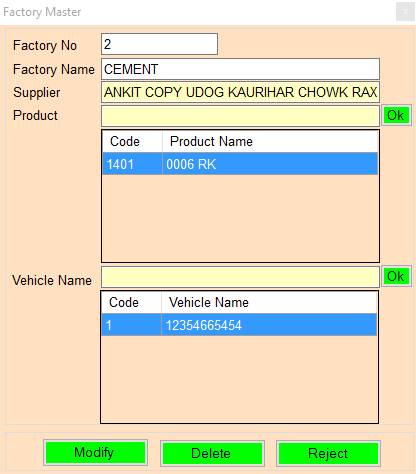
1.Factory No: Press F2 To Show Previous records Or Press Page UP/DOWN To Nevigate 1 Previous /next records.
2.Factory Name: Please Enter The Factory Name.
3.Supplier: Press Enter/Double Click To Select The Supplier Name.
4.Product: Press Enter/Double Click To Select The Product Name.
5.Vehicle Name: Press Enter/Double Click To Select The Vehicle Name.
6.Accept: Accept/Modify Factory No.
7.Delete: Delete Factory No.
8.Close: Close Form.
Created with the Personal Edition of HelpNDoc: Ensure High-Quality Documentation with HelpNDoc's Hyperlink and Library Item Reports