Vehicle Entry
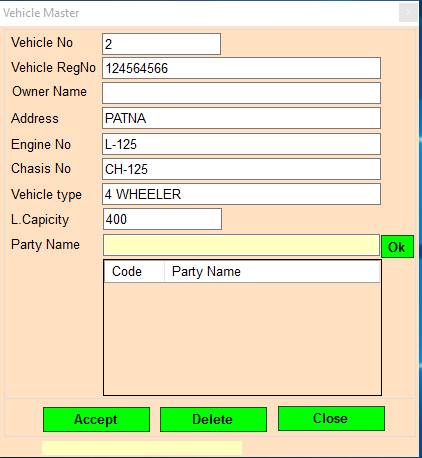
1.Vehicle No: Press F2 To Show Previous records Or Press Page UP/DOWN To Nevigate 1 Previous /next records.
2.Vehicle RegNo: Please Enter The Vehicle Registration No.
3.Owner Name: Please Enter Vehicle Owner Name.
4.Address: Please Enter The Address.
5.Engine No: Please Enter The Vehicle Engine No.
6.Chasis No: Please Enter The Vehicle Chasis No.
7.Vehicle Type: Please Enter Vehicle Type.
8.L.Capicity: Please Enter The Vehicle The Vehicle Lorry Capacity.
9.Party Name: Please Enter/Double Click To Select The Party Name.
10.Accept: Accept/Modify Vehicle No.
11.Delete: Delete Vehicle No.
12.Close: Close Form.
Created with the Personal Edition of HelpNDoc: Qt Help documentation made easy